
For a photo golf ball marker, choose a sharp original image with one clear subject, visible facial features, and room to crop without cutting off what matters. Judge the photo at a small viewing size—not just full-screen—and confirm how the maker will reproduce it before committing to a design.
- A photo golf ball marker needs a recognizable subject, not a busy scene.
- Choose the original photo over a screenshot for your personalized ball marker.
- WAZA Golf’s 'Sidekick' Custom Ball Marker is relevant for golfers who want their pet reflected in their gear.
- Check the crop and reproduction method before approving custom golf ball marker artwork.
How do you choose a clear image for a photo golf ball marker?
Choose the photograph that stays recognizable when you make it small. A favorite photo and the strongest design source are not always the same image. Keep the meaning; be selective about the frame.
For a 2026 photo golf ball marker project, start with the original file and work through the checks below. The aim is simple: your subject should still look like your subject after the background and surrounding space stop doing the work.
If you want a personalized marker rather than another generic accessory, WAZA Golf offers custom ball markers. Decide what you want the image to say before choosing the marker itself.
Start with the original
Find the photo in your camera roll or wherever you saved the original. Avoid taking a screenshot of an image you already have. A screenshot adds another step between the camera file and the artwork, and it can include interface elements or an unnecessary crop.
Use a duplicate for editing so you keep the untouched version. That gives you something to return to if a crop removes too much or an edit makes the subject look less natural. You do not need to redesign the photograph before deciding whether it is a good source.
Identify the subject
Ask yourself what someone should notice first. Your dog’s expression, a person’s face, or a meaningful object can each provide a clear focal point. A wide scene with several competing details asks more of a small design.
Choose 1 main subject as a starting point, not as a manufacturing rule. If a second person or pet is essential to the story, keep them—but check that both remain recognizable. Remove details that are there by accident rather than by choice.
Check the focus
Look closely at the features that make the subject recognizable. For a pet portrait, that means checking the eyes, nose, ears, and face rather than judging the sharpness of the grass behind them. For an object, inspect its defining edges and shape.
Do not confuse a dramatic photo with a clear one. Motion blur can feel lively in a full-size picture while obscuring the exact detail you want to carry onto your marker. Choose clear features over a more exciting background.
Check the light
Look for visible detail in both the bright and dark parts of the subject. A face hidden in shadow gives you less information to work with. A bright patch with no visible detail presents the same problem from the other direction.
Your subject does not need studio lighting. It needs readable features. Compare another photo from the same moment before trying to rescue an image with heavy filters or aggressive edits.
Test the crop
Try a tight crop that removes distractions while preserving the subject’s important features. Then try a slightly wider version. The best crop makes the subject easy to see without making the frame feel cramped.
Do not cut close to an ear, chin, paw, or other feature you want included. Leave room for the layout to change. If the finished design uses a circular area, preview that shape rather than assuming a rectangular photo will fit unchanged.
View it small
Reduce the image on your screen and look again. Can you still recognize the expression or defining shape? Does the subject stand apart from the background, or does everything merge into a patch of detail?
Compare 2 candidate photos at the same viewing size. That is a practical decision exercise, not a file requirement. Pick the one that communicates the story with less effort, even if the other photo looks better as a full-screen image.
The sequence is straightforward: start with the original, identify the subject, check focus and light, then test the crop at a small size. Keep the original alongside your preferred version so the design does not depend on an irreversible edit.
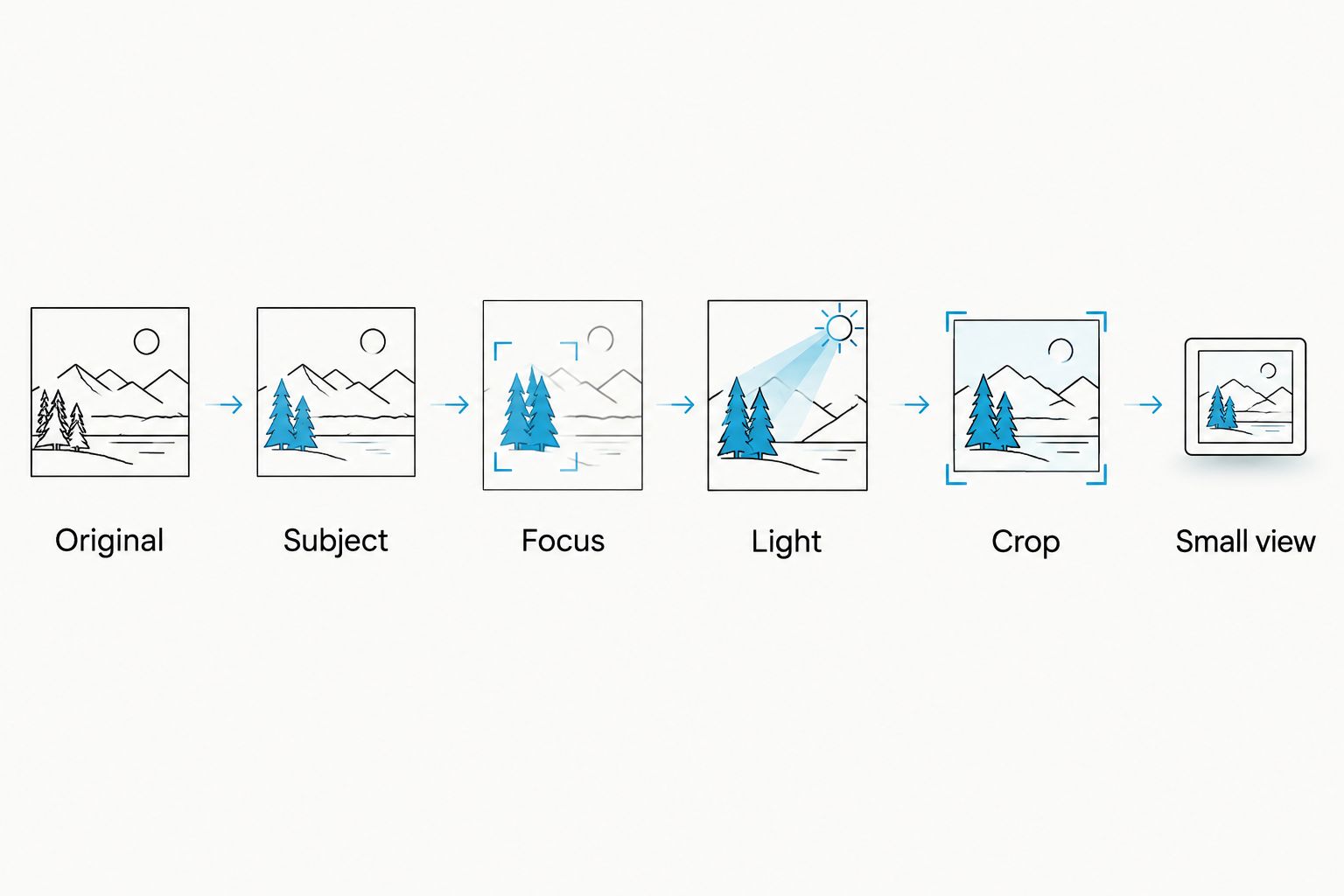
Why this matters
A personalized ball marker is something you choose for your own game. It can carry a reminder of your dog, your people, or a part of life that does not appear on a scorecard. The image should feel like yours without needing a long explanation.
A photograph that tells a whole story on your phone can become crowded in a compact design. The setting, clothing, and background might supply the meaning at full size while the face itself occupies very little space.
For your 2026 design, separate emotional value from image suitability. You can love the memory and still choose a different photo of the same subject. That keeps the connection without asking the artwork to preserve every detail of the original scene.
Which type of photo works best?
Use the comparison below to choose your starting image. These are source-photo choices, not claims about a maker’s printing or engraving capabilities.
| Photo choice | Best for | What works | What to watch |
|---|---|---|---|
| Close portrait | A recognizable person or pet | The face already takes up much of the frame | A very tight crop can leave little room around important features |
| Wider photo with a clear subject | A subject whose pose or shape matters | You have more freedom to adjust the crop | Background details can compete with the subject |
| Group or scenery photo | A memory that depends on several people or a place | It preserves more of the original context | Individual faces and fine details become harder to distinguish when reduced |
Start with a close portrait when recognition matters most. Choose a wider photo when the pose is part of the personality. Use a group or scenery image only when the shared setting matters more than facial detail.
Close portrait: best for a familiar face
A close portrait gives the design a clear starting point. The viewer does not have to search through the frame to find the person or pet. You can concentrate on expression instead of deciding which part of the picture matters.
The trade-off is cropping freedom. If the original already cuts off an ear or the top of a head, a new layout cannot restore that missing feature. Choose a portrait with enough surrounding space to keep the face intact.
Wider photo: best for personality in the pose
A wider image can capture the stance, head tilt, or outline that makes a subject feel familiar. That is useful when the pose says more than a straight-on face. A dog sitting in a characteristic way is a good example of a design idea, not a promise of a particular customization option.
The trade-off is distraction. First test a crop that removes unrelated surroundings. If the subject remains small even after cropping, choose a closer source image rather than relying on enlargement to supply detail.
Group or scenery photo: best for shared context
A group photo or landscape can matter because of where you were and who was there. It makes sense when the entire scene is the point. It is a weaker starting choice when your priority is recognizing a particular face.
The trade-off is complexity. Be honest about which details must survive. If every person, sign, tree, and background feature feels essential, consider whether that memory belongs in a full-size photo while a simpler image goes on your marker.
Why photo clarity varies
Photo clarity depends on the source image, the crop, and the way the design is reproduced. For a 2026 order, do not treat a photo-based portrait and a direct photographic reproduction as interchangeable. Ask what the finished design will actually show.
Use these factors to explain why one image is a stronger starting point than another:
- Focus on the subject. Sharp background detail does not compensate for a blurred face. Inspect the feature you want people to recognize.
- Visible light and shadow detail. Deep shadow can hide important features; bright areas without detail can do the same. Choose a source where you can see the subject clearly.
- Separation from the background. A subject that blends into nearby colors or shapes is harder to pick out. A cleaner background makes selection and cropping easier.
- Room around the subject. Extra space gives you more freedom to fit the image into a layout. A feature cut off in the original remains missing.
- Reproduction method. Printing a photograph and creating engraved artwork are different processes. Confirm the intended treatment before judging whether color, texture, or fine detail is essential.
Do not use a universal pixel or resolution rule unless it comes from the maker for the specific order. File dimensions alone do not tell you whether the subject is in focus or whether the crop works.
How do I keep the image personal without making it busy?
Keep the personal meaning in the subject, not in extra decoration. Your dog’s expression or a familiar face can do more than a crowded combination of an image, a date, a slogan, and a background.
Choose the detail you would miss most if it disappeared. Build around that. A photograph does not need to contain your entire story to feel like part of it.
For a 2026 design, write yourself a short brief before editing: who or what is pictured, what makes it recognizable, and what you are comfortable leaving out. This keeps you from adding elements simply because there is space to fill.
Should I edit my photo before sending it?
Make a useful crop, but keep the original file. Light editing can help you communicate the layout you prefer; it should not replace the source image or hide problems you need to address.
Avoid treating sharpening, filters, or enlargement as a substitute for a clearer photograph. Compare your edited version with the original. If the eyes, outline, or expression look less natural, step back and use a different source.
Keep any suggested crop separate from the untouched image. That lets you show your preference without forcing the design to begin with an already restricted frame.
Which WAZA Golf marker fits your photo?
Choose the marker around the connection you want to carry. Both options below let you upload pictures and provide engraving instructions; WAZA Golf reviews your design before engraving.
| Marker | Best for | Personalization | What to check |
|---|---|---|---|
| 'Memory' Custom Ball Marker | A family photo, favorite person or meaningful memory | Upload your picture and add back text where applicable | A busy scene can make the important subject harder to recognize |
| 'Sidekick' Custom Ball Marker | Your pet or companion | Upload pet pictures and optionally add their name on the back | Choose a photo with clear facial features and space around the subject |
These markers are engraved, not a promise of a full-color photographic print. Pick the source image for recognition and personal meaning, then check the current product options before ordering.
Can a pet photo become a personal ball marker?
A pet photo is a natural starting point for a marker that reflects your life off the course. Choose an image where the pet’s defining features are clear rather than one where the setting takes up most of the frame.
WAZA Golf’s 'Sidekick' Custom Ball Marker is designed around keeping your companion close during a round. Select your marker type, upload your pet’s picture, and optionally add their name on the back.
WAZA Golf’s personalized ball markers are best for golfers who want their gear to reflect their own story. The 'Sidekick' concept fits a pet-focused design, but that relevance does not make every photo a strong source. A meaningful image still needs a clear subject and a workable crop.
What should I check before approving the design?
Use 3 final checks: recognition, crop, and intended reproduction. These are decision checks, not technical specifications. They keep attention on what you actually want to carry onto the course.
- Recognition: Does the subject still look familiar at a small viewing size? Check the defining features, not just the overall outline.
- Crop: Are the features you care about included? Check the edges as carefully as the center.
- Intended reproduction: Does the design treatment match your expectation? Ask whether the result is photographic, illustrative, or engraved before assuming it will look like the original file.
For a 2026 approval, judge any preview at a reduced size as well as enlarged. An enlarged view helps you inspect detail; a small view helps you judge whether that detail contributes to recognition.
If the design does not read clearly, simplify before adding more. Revisit the source image, remove background distractions, or change the crop. More decoration is not the answer to an unclear focal point.
FAQ
What's the best photo for a photo golf ball marker?
The best photo golf ball marker source is a sharp original image with a clear subject and room to crop. Choose a photo whose defining features remain recognizable when you view it small.
Can I use a screenshot for my personalized ball marker?
Use the original photo instead of a screenshot when you have it. A screenshot can add an unnecessary crop or interface elements and does not replace the original image file.
Does my pet need to face the camera?
Your pet does not need to face the camera directly, but its defining features need to be visible. Choose the angle that best preserves the expression or outline you recognize.
What resolution does a photo golf ball marker need?
Use the maker’s file requirements for the specific marker rather than a universal resolution rule. Resolution alone does not establish whether the face is in focus or the crop is suitable.
Will an engraved marker look exactly like my color photo?
Do not assume engraved artwork will look exactly like a color photograph. Confirm the reproduction method and check how it handles the details that matter to you.
Can I put my pet's name on a WAZA Golf ball marker?
The 'Sidekick' Custom Ball Marker description includes the option to have your pet’s or sidekick’s name etched on the back. Check the product’s current customization instructions when choosing your design.
Should I choose a group photo or a close portrait?
Choose a close portrait when recognizing a face is your priority. Choose a group photo when the shared scene matters more, accepting that individual faces become harder to distinguish at a small size.
One last thing
The most personal photo is not always the one with the most information. Sometimes the smaller detail—a familiar head tilt, an expression, a recognizable outline—is what makes the image yours.
Before you choose, cover the background on your screen and look only at the subject. If the connection is still there, you have found the part worth keeping. Start there. Let your marker reflect the person behind the player.